Building
Host functions
Shoppingate adds its own APIs on top of the standard Mini App ones — orders, payment, refunds, support tickets and the app language. These extended APIs must be declared in SGConf.js before ft.<name>(...) will work.
What goes in SGConf.js — and what does not
There are two kinds of APIs in a Mini App. Only the Shoppingate extended APIs need to be registered.
API
Needs registering?
Called as
Built-in Mini App APIs —
getUserInfo, getSetting, authorize, showModal, navigateTo, getStorageSync, …No
ft.getUserInfo(...)
Shoppingate extended APIs —
orderPayment, getUserOrders, createTicket, …Yes
ft.orderPayment(...)
getUserInfo is not in SGConf.js and does not need to be — it ships with the runtime. See Permissions for how to call it.
Register only the APIs you actually call.
Step 1 — get your API list from the developer portal
Every API your Mini App can use is listed in the Shoppingate developer portal. Public APIs are available to every Mini App. Private APIs must be requested first and approved by an admin before your Mini App can call them. The full walkthrough is on the Dev portal → App Binding page.
1. Open API Configuration
In the developer portal, open:
Mini-Program  →  your Mini App  →  Information Details  →  App Binding
              →  API Configuration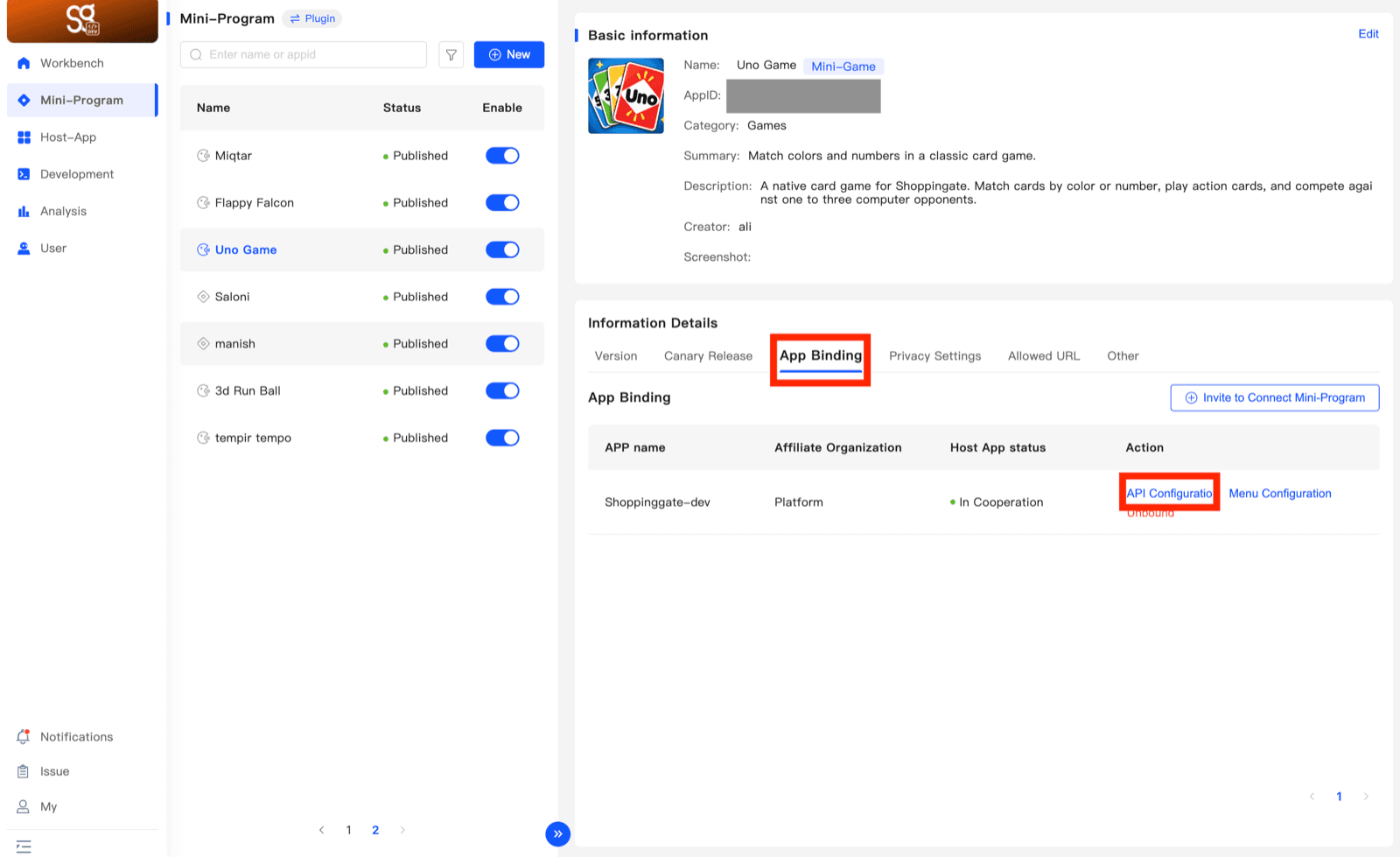
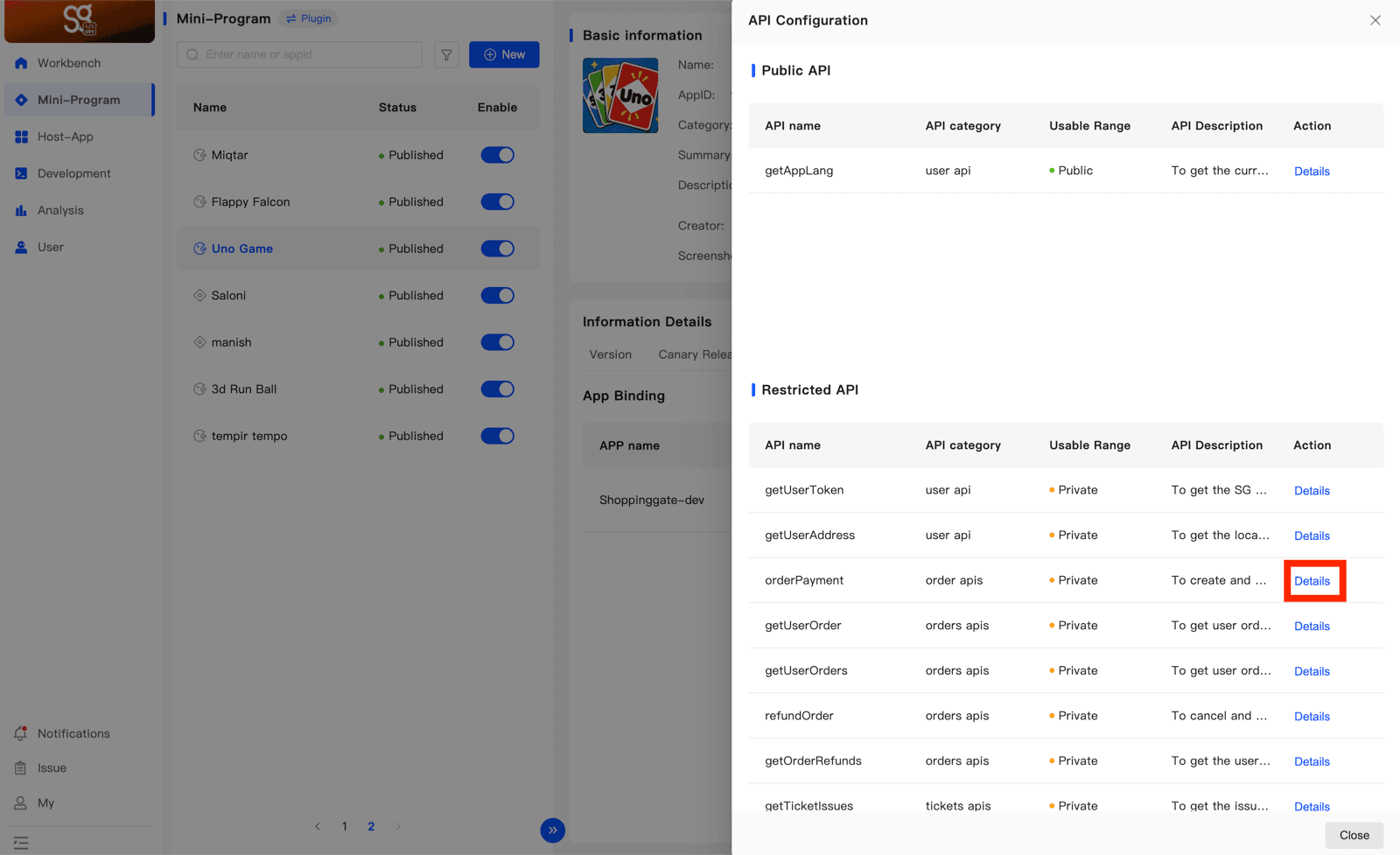
2. Find the API
API Configuration shows two lists:
- Public API — the APIs your Mini App can call right now.
- Restricted API — the APIs that need permission before use. Request them as shown in the next step.
Each row has the same columns:
- API name — the exact name to register, and to call as
ft.<name> - API category — e.g.
user api,order apis,tickets apis - Usable Range —
PublicorPrivate - API Description — one line on what it does
- Action — Details opens the API and, for a restricted API, the request form
3. Request a restricted API
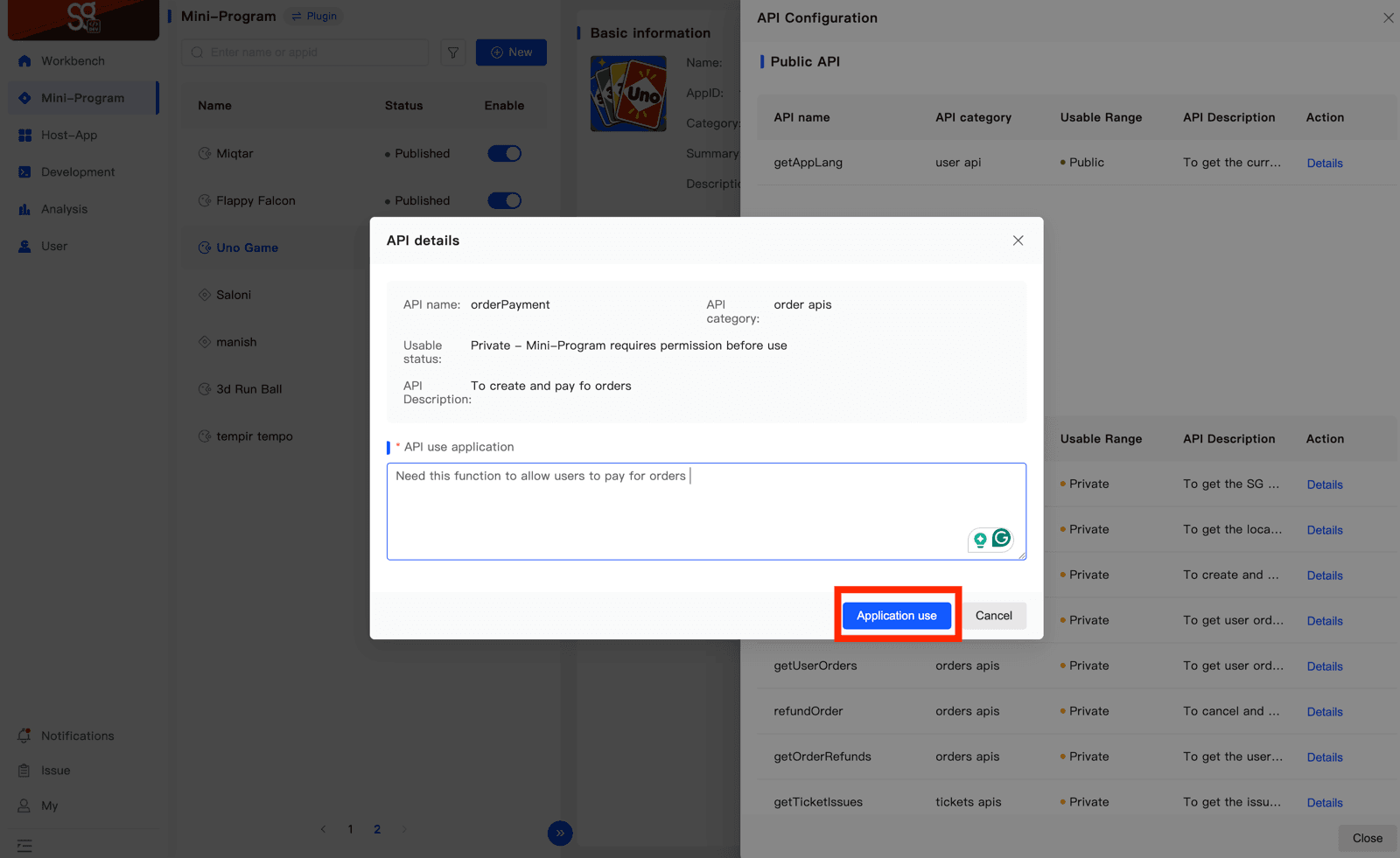
Click Details on the API in the Restricted API list. In API use application, write why your Mini App needs it, then click Application use.
4. After approval
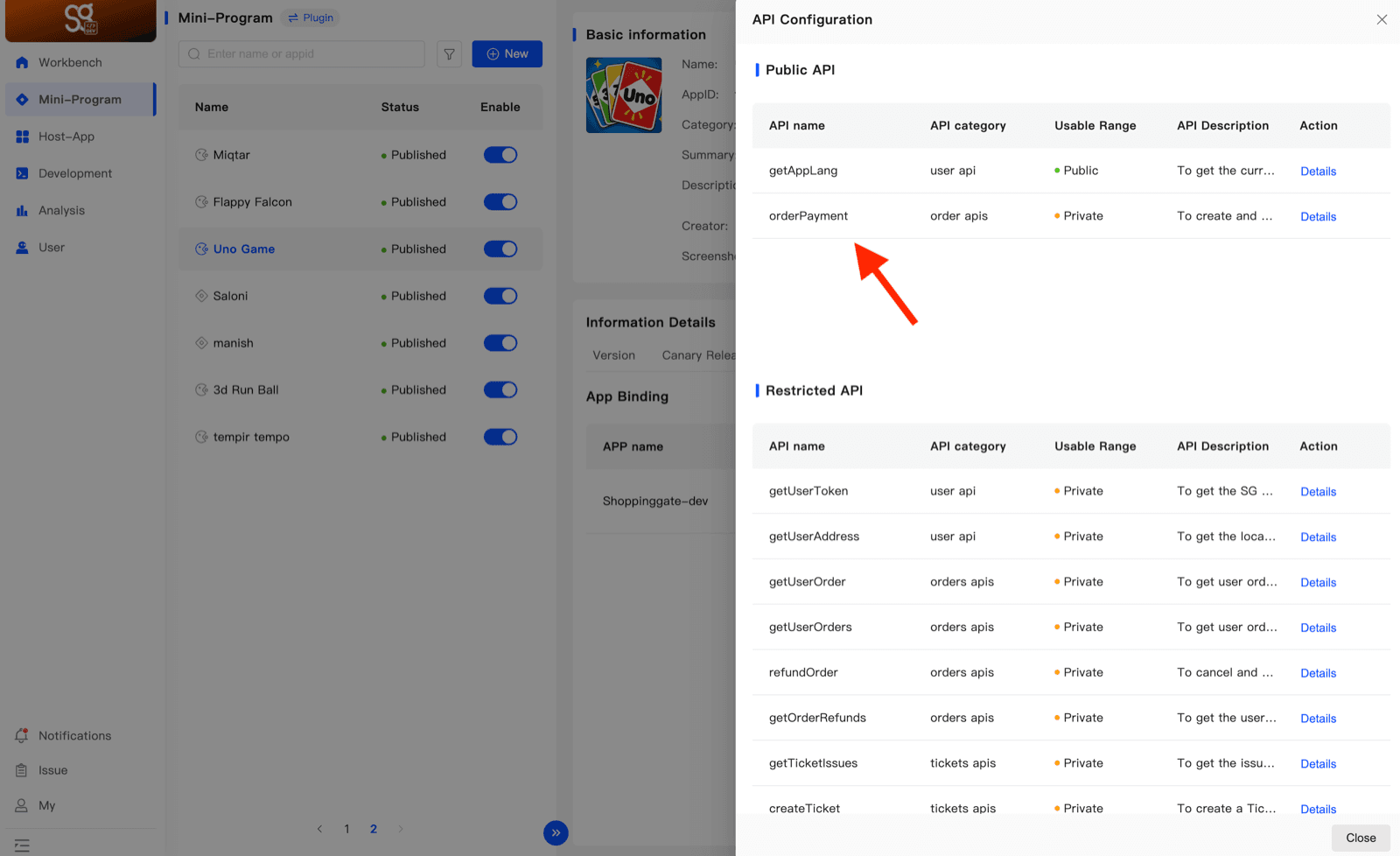
Once an admin approves the request, the API moves to the Public API list. Its Usable Range still says Private — that is expected. It is now available to your Mini App, and you can register it in SGConf.js.
The portal gives you the name and a one-line description only. The parameters and the response for each API are in the API reference below. The extended APIs at the time of writing:
API
What it does
Category
Range
getAppLang
Returns the host app's current language —
'en' or 'ar'. The one extended API that takes no miniappId.user api
Public
orderPayment
Creates the order and opens the payment sheet. See the full page: orderPayment.
order apis
Private
getUserOrders
Returns the current user's orders in this Mini App, one page at a time.
orders apis
Private
getTicketIssues
Returns the list of issue types a user can pick when opening a ticket. Pass the chosen
id to createTicket.tickets apis
Private
getUserTickets
Returns the current user's tickets for an order, one page at a time.
tickets apis
Private
Step 2 — create SGConf.js
Create one file at the project root, exporting an extApi array — one entry per API, with its name, whether it is synchronous, and its parameters. This example registers every API in the list above:
// SGConf.js
module.exports = {
    extApi: [
        // user apis
        {
            name: 'getAppLang',
            sync: false,
            params: {}
        },
        // order apis
        {
            name: 'orderPayment',
            sync: false,
            params: {
                orderInfo: {},
                idempotencyKey: '',
                miniappId: '',
            }
        },
        {
            name: 'getUserOrder',
            sync: false,
            params: {
                orderId: '',
                miniappId: '',
            }
        },
        {
            name: 'getUserOrders',
            sync: false,
            params: {
                page: 1,
                perPage: 5,
                miniappId: '',
            },
        },
        {
            name: 'refundOrder',
            sync: false,
            params: {
                orderId: '',
                amount: 0.0,
                reason: '',
                miniappId: '',
            }
        },
        {
            name: 'getOrderRefunds',
            sync: false,
            params: {
                orderId: '',
                miniappId: '',
            }
        },
        // ticket apis
        {
            name: 'getTicketIssues',
            sync: false,
            params: {
                miniappId: '',
            }
        },
        {
            name: 'createTicket',
            sync: false,
            params: {
                issueId: 0,
                orderId: '',
                reason: '',
                affectedProducts: [],
                imageFilePath: '',
                miniappId: '',
            }
        },
        {
            name: 'getUserTickets',
            sync: false,
            params: {
                orderId: '',
                miniappId: '',
                page: 1,
                limit: 10,
            }
        },
    ]
}
Three rules for an entry:
namemust match the portal exactly. It is also the method name onft.sync: falsefor all of these — they takesuccess/failcallbacks.paramsdeclares the parameter names with placeholder values of the right type (''string,0/1/0.0number,{}object,[]array). The values are not defaults; only the shape matters.
miniappId is required on every extended API except getAppLang. Read it once at launch and keep it in globalData.// app.js
App({
globalData: {
miniappId: '',
},
onLaunch() {
const info = ft.getAccountInfoSync();
this.globalData.miniappId = info && info.miniProgram && info.miniProgram.appId;
},
})Step 3 — how it is picked up
Nothing in your code imports SGConf.js. There is no require('./SGConf.js') anywhere, and the ft.* calls still work. The toolchain reads the file by name from the project root and registers the methods on the ft global.
So: put the file at the root, use the exact filename, and do not import it.
Step 4 — calling an API
Every extended API is a method on ft, with success and fail callbacks — the same shape as the built-in APIs. The parameters are the ones you declared in params.
Blank project
// pages/bookings/bookings.js
const app = getApp()

ft.getUserOrders({
    page: 1,
    perPage: 10,
    miniappId: app.globalData.miniappId,
    success: (res) => {
        console.log(res.result, res.total, res.orders);
    },
    fail: (err) => console.log('getUserOrders fail', err),
});
Taro + React
import { useDidShow } from '@tarojs/taro'

useDidShow(() => {
    ft.getUserOrders({
        page: 1,
        perPage: 10,
        miniappId,
        success: (res) => setOrders(res.orders),
        fail: (err) => console.log('getUserOrders fail', err),
    })
})
Taro + Vue
const app = createApp({
    onShow() {
        ft.getUserOrders({
            page: 1,
            perPage: 10,
            miniappId,
            success: (res) => { store.orders = res.orders },
            fail: (err) => console.log('getUserOrders fail', err),
        })
    },
})
Extended APIs are always called on
ft, never through Taro.*. Taro wraps the standard cross-platform APIs; it has no wrapper for a host's custom APIs, so there is nothing for Taro.getUserOrders to be. This is true in every project type.Step 5 — the response envelope
Extended APIs answer with a result field, not the errMsg string the built-in APIs use:
{ result: 'success', /* ...payload... */ }
{ result: 'failure', message: 'why it failed' }
Check result for the outcome and read message when it failed. The payload key differs per API — orders, order, refunds, tickets, issues, refundInfo — listed in the reference below.
API reference
Every API with its parameters, an example call and what it returns. The examples read miniappId from app.globalData, as set up in Step 2.
getAppLang
Publicuser apiReturns the host app's current language — 'en' or 'ar'. The one extended API that takes no miniappId.
Parameters
None.
Example
ft.getAppLang({
    success: (res) => {
        if (res.result === 'success') {
            console.log(res.language);   // 'en' or 'ar'
        }
    },
    fail: (err) => console.log('getAppLang fail', err),
});
Response
{ result: 'success', language: 'en' }   // or 'ar'
{ result: 'failure', language: null }
orderPayment
Privateorder apisCreates the order and opens the payment sheet. See the full page: orderPayment.
Parameters
orderInfoobject
The order — items, amounts, address, and your
vendor_order_ref. All fields are on the orderPayment page.idempotencyKeystring
miniappIdRequired
Your Mini App id. In a native page,
ft.getAccountInfoSync(); in a web view, ft.getAppletInfo.Example
ft.orderPayment({
    orderInfo: {
        vendor_order_ref: '1234567orderid',
        items: [ /* your items */ ],
        subtotal: '98.00',
        total_amount: '98.00',
        currency: 'SAR',
    },
    idempotencyKey: 'your-idempotency-key',
    miniappId: app.globalData.miniappId,
    success: (res) => {
        if (res.result !== 'success') {
            console.log('orderPayment failed', res.message);
            return;
        }
        console.log(res.status, res.order_id);
    },
    fail: (err) => console.log('orderPayment fail', err),
});
Response
// failure
{ result: 'failure', message }

// success
{ result: 'success', status, order_id, message }
status is the outcome of the payment attempt, not an order status:
'already_paid'— paid in an earlier session, nothing left to charge'created'— the order exists, the user backed out without paying- anything else — paid; the real status name from the backend
⚠️ order_id here is the super app's uuid, not your reference. This is the one API that returns the uuid. Your own reference goes out in orderInfo.vendor_order_ref, and that is what deep links come back on.
getUserOrder
Privateorders apisReturns one order of the current user.
Parameters
orderIdstring
miniappIdRequired
Your Mini App id. In a native page,
ft.getAccountInfoSync(); in a web view, ft.getAppletInfo.Example
ft.getUserOrder({
    orderId: '1234567orderid',
    miniappId: app.globalData.miniappId,
    success: (res) => {
        if (res.result === 'success') {
            console.log(res.order);
        }
    },
    fail: (err) => console.log('getUserOrder fail', err),
});
Response
{ result, order: { /* order */ } }The order object is described in The order object.
getUserOrders
Privateorders apisReturns the current user's orders in this Mini App, one page at a time.
Parameters
pagenumber
Page number, starting at
1.perPagenumber
Orders per page.
miniappIdRequired
Your Mini App id. In a native page,
ft.getAccountInfoSync(); in a web view, ft.getAppletInfo.Example
ft.getUserOrders({
    page: 1,
    perPage: 10,
    miniappId: app.globalData.miniappId,
    success: (res) => {
        if (res.result === 'success') {
            console.log(res.total, res.orders);
        }
    },
    fail: (err) => console.log('getUserOrders fail', err),
});
Response
{ result, total, page, per_page, orders: [ /* order */ ] }Each item in
orders is an order object.refundOrder
Privateorders apisRequests a refund for an order — the full amount or part of it.
Parameters
orderIdstring
amountnumber
The amount to refund. Can be the full order amount or a partial amount.
reasonstring
miniappIdRequired
Your Mini App id. In a native page,
ft.getAccountInfoSync(); in a web view, ft.getAppletInfo.Example
ft.refundOrder({
    orderId: '1234567orderid',
    amount: 25.0,
    reason: 'Item not available',
    miniappId: app.globalData.miniappId,
    success: (res) => {
        if (res.result === 'success') {
            console.log(res.refundInfo);
        }
    },
    fail: (err) => console.log('refundOrder fail', err),
});
Response
{ result, refundInfo: { /* refund */ } }The refund object is described in The refund object.
getOrderRefunds
Privateorders apisReturns the refunds of one order.
Parameters
orderIdstring
miniappIdRequired
Your Mini App id. In a native page,
ft.getAccountInfoSync(); in a web view, ft.getAppletInfo.Example
ft.getOrderRefunds({
    orderId: '1234567orderid',
    miniappId: app.globalData.miniappId,
    success: (res) => {
        if (res.result === 'success') {
            console.log(res.refunds);
        }
    },
    fail: (err) => console.log('getOrderRefunds fail', err),
});
Response
{ result, refunds: [ /* refund */ ] }Each item in
refunds is a refund object.getTicketIssues
Privatetickets apisReturns the list of issue types a user can pick when opening a ticket. Pass the chosen id to createTicket.
Parameters
miniappIdRequired
Your Mini App id. In a native page,
ft.getAccountInfoSync(); in a web view, ft.getAppletInfo.Example
ft.getTicketIssues({
    miniappId: app.globalData.miniappId,
    success: (res) => {
        if (res.result === 'success') {
            console.log(res.issues);   // [ { id, name, code } ]
        }
    },
    fail: (err) => console.log('getTicketIssues fail', err),
});
Response
{ result, issues: [ { id, name, code } ] }code is currently null on every issue. Use id.createTicket
Privatetickets apisOpens a support ticket for an order on behalf of the user.
Parameters
issueIdnumber
The
id of an issue from getTicketIssues.orderIdstring
reasonstring
affectedProductsarray
imageFilePathstring
A local file path from a picker:
ft.chooseImage (res.tempFilePaths[0]), or in a native page ft.chooseMedia (res.tempFiles[0].tempFilePath). See Permissions → pickers.miniappIdRequired
Your Mini App id. In a native page,
ft.getAccountInfoSync(); in a web view, ft.getAppletInfo.Example
ft.createTicket({
    issueId: 3,
    orderId: '1234567orderid',
    reason: 'The order arrived damaged',
    affectedProducts: [],
    imageFilePath: imagePath,   // from ft.chooseMedia
    miniappId: app.globalData.miniappId,
    success: (res) => {
        if (res.result !== 'success') {
            console.log('createTicket failed', res.message);
            return;
        }
        console.log(res.ticket);
    },
    fail: (err) => console.log('createTicket fail', err),
});
Response
{ result, message, ticket: { /* ticket */ } }The ticket object is described in The ticket object.
getUserTickets
Privatetickets apisReturns the current user's tickets for an order, one page at a time.
Parameters
orderIdstring
miniappIdRequired
Your Mini App id. In a native page,
ft.getAccountInfoSync(); in a web view, ft.getAppletInfo.pagenumber
Page number, starting at
1.limitnumber
Tickets per page, e.g.
10.Example
ft.getUserTickets({
    orderId: '1234567orderid',
    miniappId: app.globalData.miniappId,
    page: 1,
    limit: 10,
    success: (res) => {
        if (res.result === 'success') {
            console.log(res.total, res.tickets);
        }
    },
    fail: (err) => console.log('getUserTickets fail', err),
});
Response
{ result, total, page, limit, tickets: [ /* ticket */ ] }Each item in
tickets is a ticket object.The order object
Returned by getUserOrder (as order) and getUserOrders (in orders).
order_id
Your reference, e.g.
1234567orderid — not the super app's uuid.status
A plain localized string.
'created' means unpaid.items[]
The items you sent in
orderInfo.items when you created the order with orderPayment — so the shape is yours. For example name, qty, unit_price, sku, booking_date; there can be more fields or fewer.subtotal, tax_amount, delivery_fee, total_amount
Strings, not numbers.
currency
e.g.
SAR.customer_address
An object in
getUserOrder; a plain string in getUserOrders.cancellation_reason
Empty unless cancelled.
created_at, updated_at
ISO strings.
The refund object
Returned by refundOrder (as refundInfo) and getOrderRefunds (in refunds).
refund_uuid
amount, settled_amount
is_partial
Boolean.
status
An object:
{ id, name }.reason, rejection_reason
requested_at, completed_at, rejected_at
The ticket object
Returned by createTicket (as ticket) and getUserTickets (in tickets).
ticket_id, ticket_no
status
An object:
{ id, name }. Open statuses are open, pending and in_progress.order_id
Your reference.
issue
An object:
{ name }.reason
affected_product
Singular in the list from
getUserTickets.upload_image_url
admin_notes
created_at, updated_at